Statistical Methods for Quality Control
Statistical methods for quality Control involve the use of collected data and quality standards to find new ways to improve products and services. These methods characteristically involve attempts to infer the properties of a large collection of data.
OriginPro provides various methods and tools for quality control:
Statistical Process Control (SPC)
The Statistical Process Control (SPC) App, for OriginPro brings together five key SPC features:

Control Charts
The SPC App offers a wide variety of configurable control charts:
For Subgroups
- Xbar-R
- Xbar-S
- I-MR-R/S
- Xbar
- R
- S
- Zone
For Individuals
- I-MR
- Z-MR
- Individuals
- Moving Range
Attributes Charts
- P/U Chart Diagnostic
- P/U Chart
- Laney P' / U'
- NP
- C
Time-Weighted Charts
- Moving Average
- EWMA
- CUSUM
Multivariate Charts
- T^2-Generalized Variance
- T^2
- Generalized Variance
- Multivariate EWMA
Process Overview
The Process Overview tool in the SPC app offers reports with charts and capability statistics. It helps you to identify problem areas and gain insights into your data:
- Xbar / Individuals charts
- Probability plot
- Capability histogram
- Capability plot
- Capability statistics
Capability Analysis
Capability analysis is used to detect whether a process meets specifications. The SPC app provides following features of capability analysis:
- Capability Histogram
- Cp, Cpk, Cpm, Pp, Ppk etc
- Performance Report
- Multiple Variables
- Support different data types
- Automated
- Normal
- Between/Within
- Nonparametric
- Non-normal
- Binomial
- Poisson
Data Transformation
The SPC app provides 3 transformation functions to make data approximately normal:
- Box-Cox Transform
- Johnson Transform
- Yeo-Johnson Transform
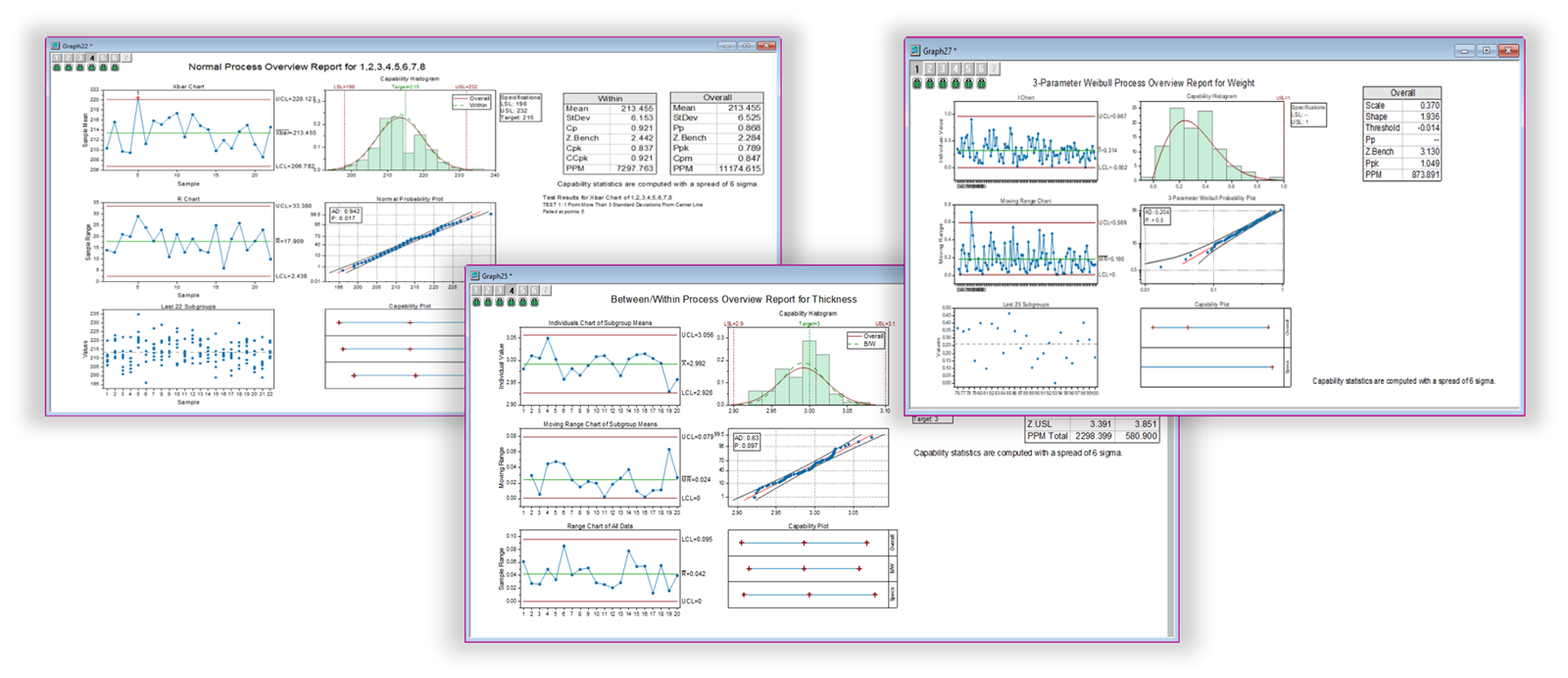
The Process Overview tools generate a combination report with multiple charts and statistics. It enables a user to assess the quality or capability of a process in a glance

The reports of Capability Analysis include control charts and capability reports with Cp, Cpk, Pp and Ppk indices, to help the user to access whether the process meet the specifications
Identify Data Distribution
The SPC App provides 14 distributions and 3 transformation functions to help to identify your data distribution:
- Normal
- Logistic
- Lognormal / 3-Parameter-Lognormal
- Log-logistic
- Weibull / 3-Parameter Weibull
- Gamma
- Rayleigh
- Smallest Extreme Value
- Largest Extreme Value
- Exponential / 2-Parameter Exponential
- Gaussian Mixture
- Folded Normal
- Box-Cox Transformation
- Johnson Transformation
- Yeo-Johnson Transformation

Origin provides 14 distributions and 3 transformation functions to help to identify your data distribution
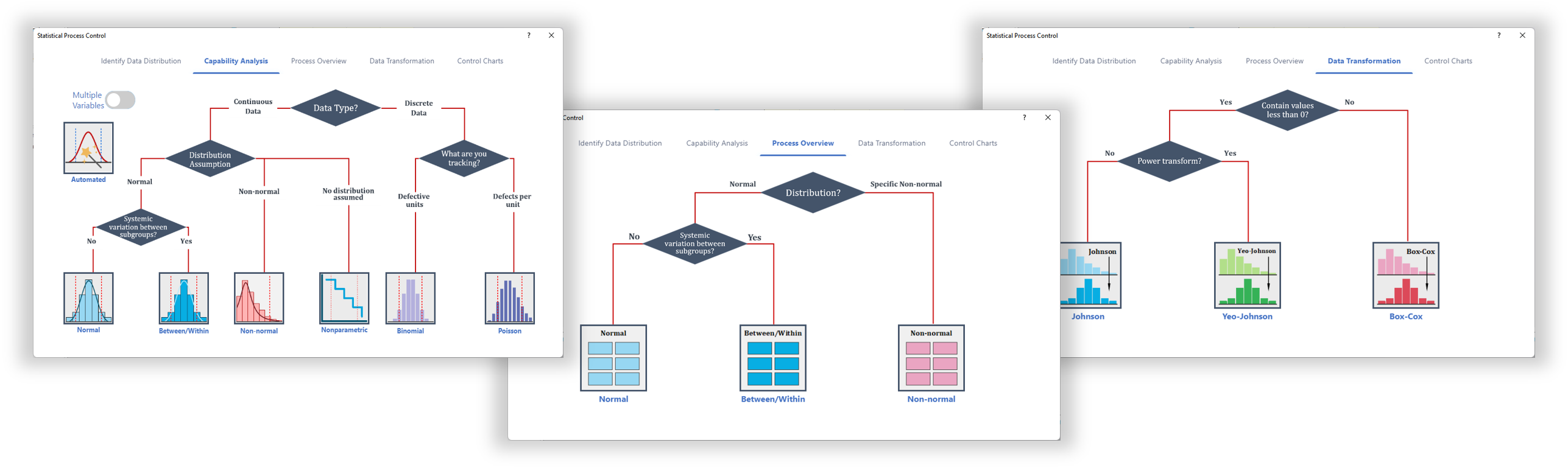
Start from the decision map, choose a proper tool basing on your data type and generate powerful reports.
Measurement System Analysis (MSA)
Origin provides two tools for Measurement System Analysis:

Gage R&R Study
The Gage Study App supports the following features:
- Type 1 Gage Study
- Gage Linear Bias Analysis
- Crossed Gage R&R Study
- Nested Gage R&R Study
- Expanded Gage R&R Study
- Attribute Gage Study
- Create Gage Worksheet
- Gage Run Chart
Attribute Agreement Analysis
The Attribute Agreement Analysis App is designed to assess the degree of agreement between appraisers' ratings and known standards. This App supports the following:
- Kappa Statistics
- Kendall's Coefficient of Concordance
- Within Appraisers Analysis
- All Appraisers vs. Standard Analysis
- Agreement Graphs
- Confidence Intervals
- Misclassification Rates
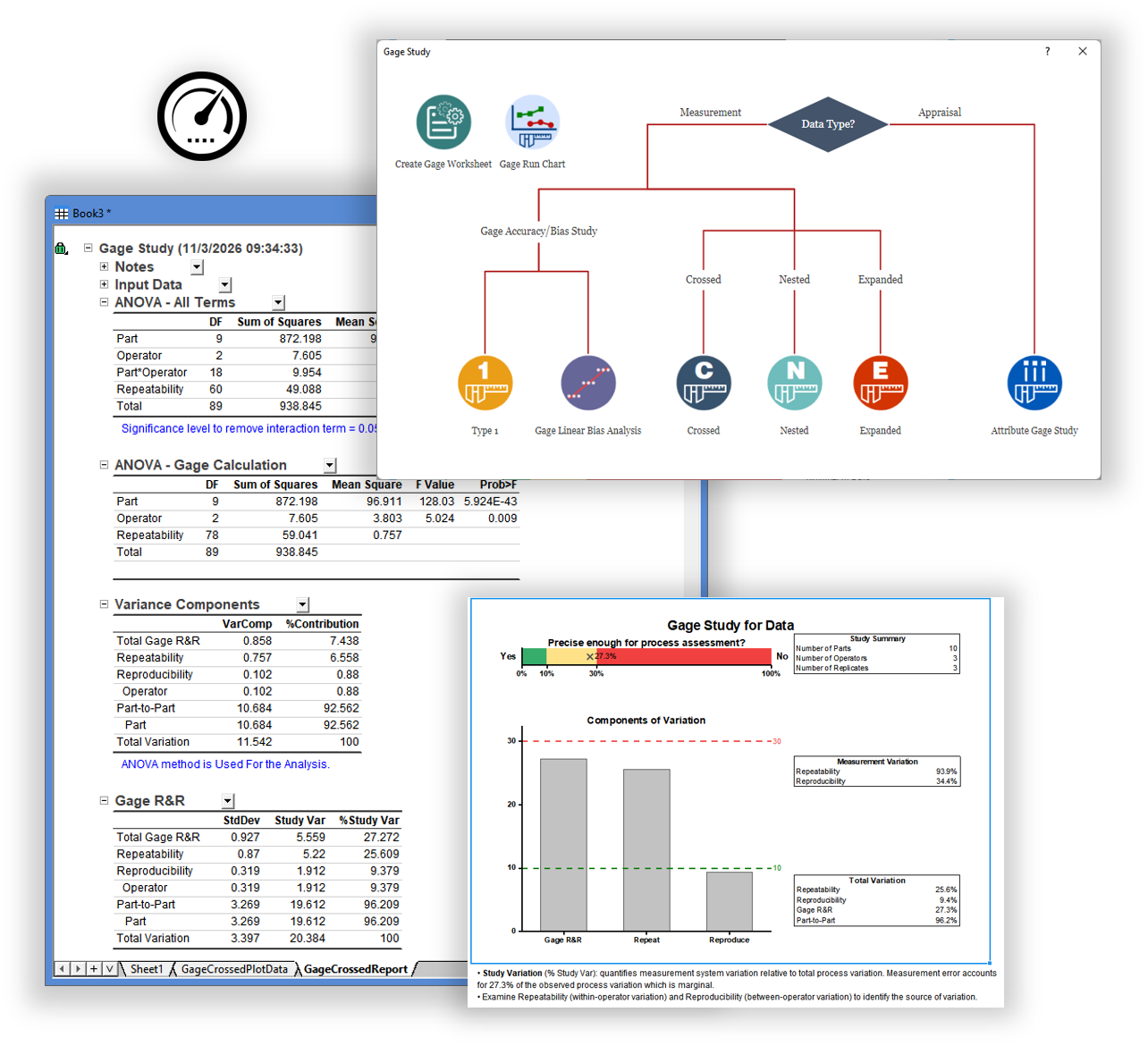
The Gage Study interface in Origin provides a decision map that helps you choose the analysis you need, and the report sheet presents the detailed statistics together with a conclusion chart that supports your decision-making.
Acceptance Sampling
Origin offers three tools for Acceptance Sampling
- Attributes Acceptance Sampling
- Variables Acceptance Sampling (Create/Compare)
- Variables Acceptance Sampling (Accept /Reject Lot)
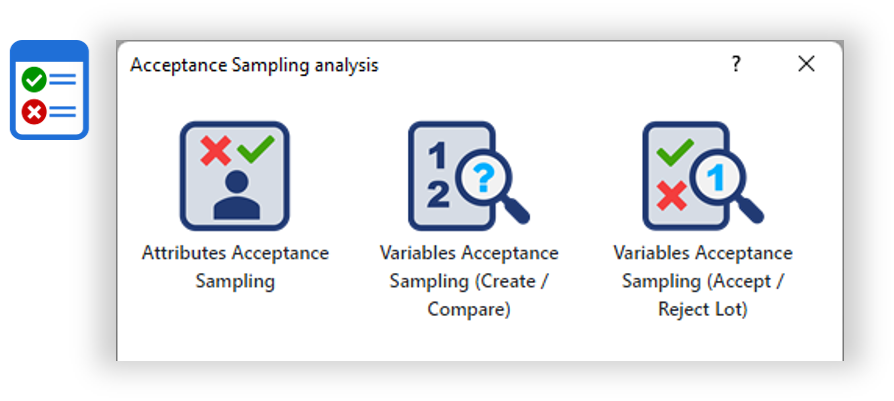
The Acceptance Sampling app helps design or evaluate inspection plans for incoming raw materials or outgoing final products
Tolerance Intervals
Origin offers Tolerance intervals app, which is important tool in quality control. It helps understand and manage variability in production processes. The tolerance intervals app in Origin provides the following features
- Support multiple distributions
- Normal
- Lognormal
- Gamma
- Exponential
- Smallest Extreme Value
- Weibull
- Largest Extreme Value
- Logistic
- Loglogistic
- Nonparametric
- Parametric and non-parametric tolerance intervals
- Sample size & Maximum Population Percentage in Intervall
- Graphical report including interval plot, histogram and probability plots
Stability Study
The stability study app provides two tools to collect data and model the relationship between time and quality characteristics across multiple storage conditions or batches
- Create Stability Study worksheet
- Create a custom worksheet for stability study data collection,
- Stability study
- Fit a general linear model against time and batch, which can be used to predict shelf life

The result of stability study includes a combination report with graphical analysis and a report sheet with Model selection, Parameter estimation, statistics, ANOVA table and Shelf life estimation.
Design of Experiments (DOE)
The Design of Experiments (DOE) App for OriginPro enables researchers to walk through each step of the design of experiments process.
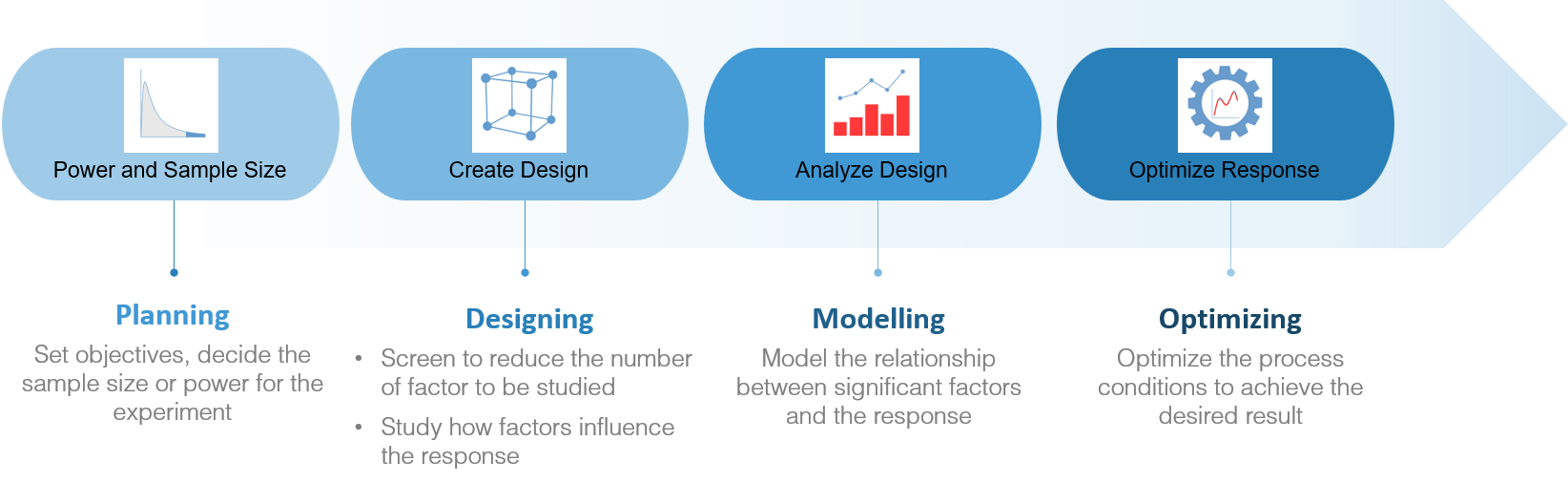
Power and sample size
- Determine the minimum sample size required to achieve a certain level of power for detecting a specified effect size
- Find the right balance that ensures robust and valid experimental outcomes
Define Custom Design
Create a design from data in the worksheet
Design
- Definitive screening design
- Factorial design, including 2-level factorial, 2-level split-plot, Plackett-Burman and general full factorial
- Response surface design, including central composite and Box-Behnken
- Mixture design, including simplex centroid, simplex lattice and extreme vertices
- Taguchi design, including static and dynamic
- Optimal design
Analysis
- Linear+ Interaction+Square models
- Optimize model with stepwise selection
- Analyze variability
- Analyze binary response
- Goodness-of-fit
- Fits and residual diagnostics
- Find Y from X
- Pseudo-components
- Coding schemes for categorical factors
- Report regression equation.
Graphics
- Overlaid Contour Plot
- Fitted Plot
- Residual Plot
- Effects Plot
- Main Effects Plot
- 2-way Interaction Plots
- Contour Plot
- Surface Plot
- Simplex Design Plot
Optimize
- Search for optimal responses based on the goal:minimize, maximize and target.
- Constraint factors to a region or hold at a fixed value.
- Display the optimization plot, in which you can tune factor settings to improve the solution.
- Simultaneously optimize multiple responses, each with a different model
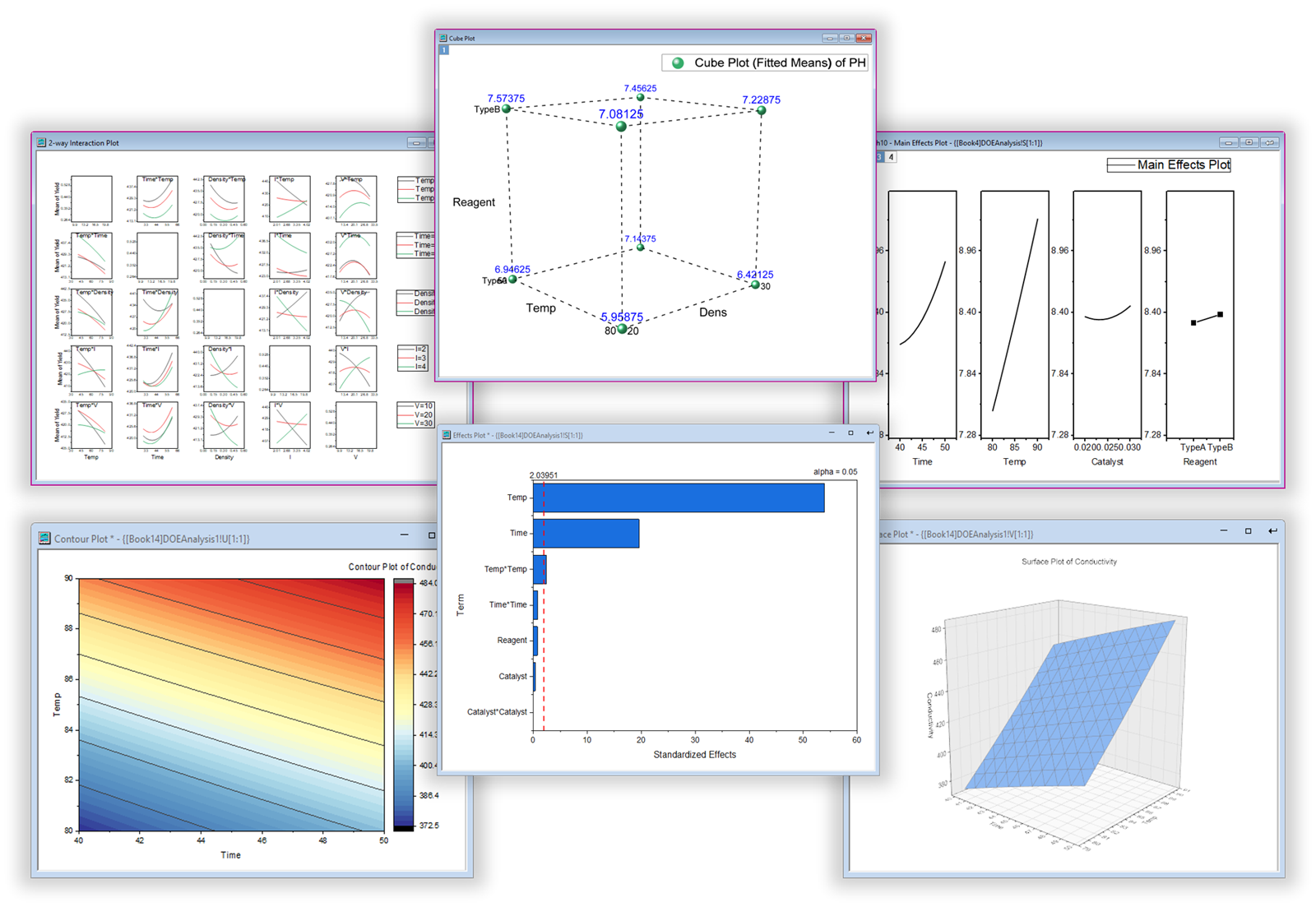
Origin provides various graphs to help you to visualize the results.
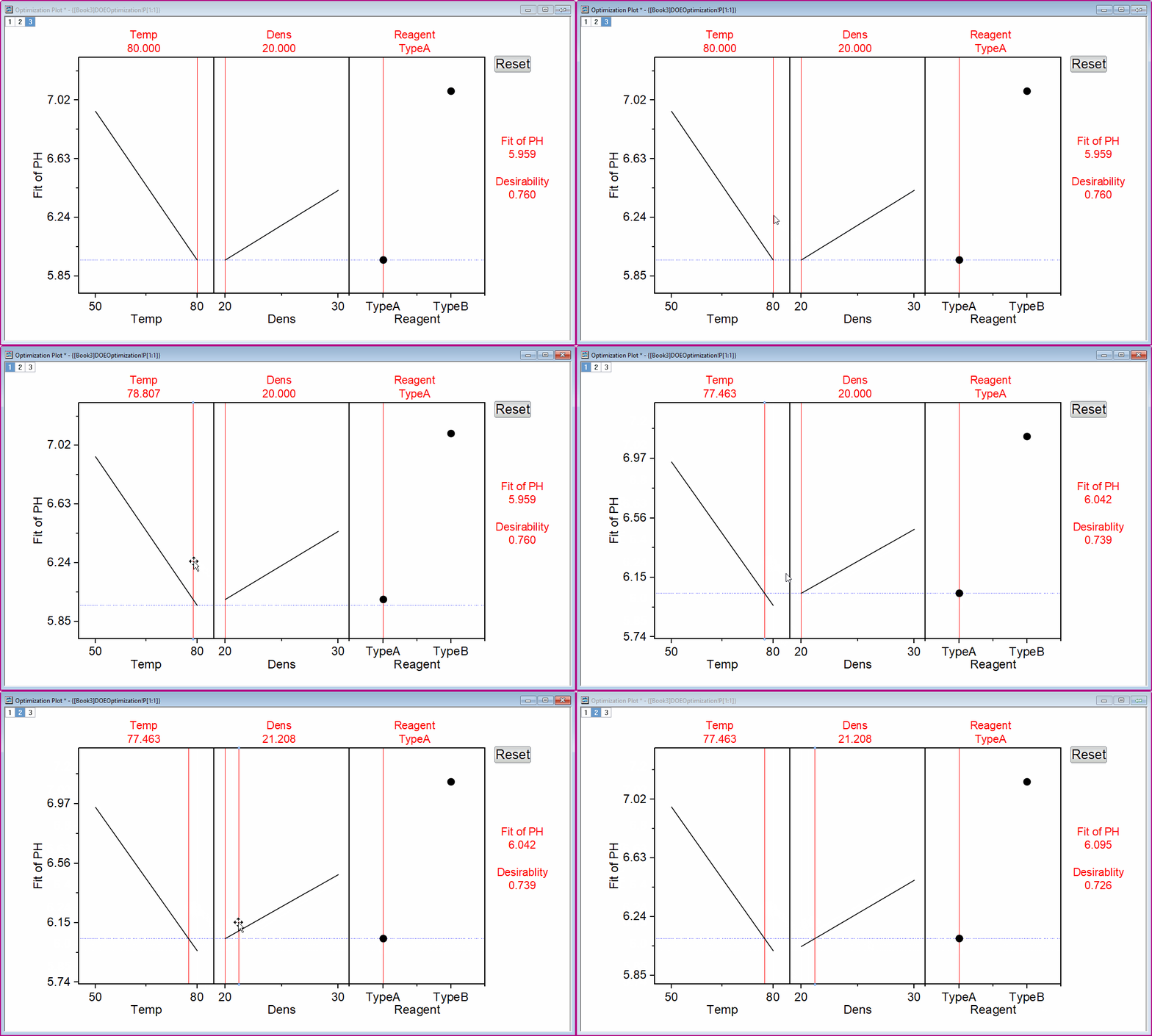
Move the vertical red lines to change factor values to view how they affect the composite desirability and the responses in the real time
Statistical Charts
Origin supports many types of graphs which are useful in quality improvement area
- Variability Chart
- Multi-Vari Chart
- Pareto Charts
- Main Effect Plot
- Interaction Plot
- Multiple Comparison Plot
- Histograms
- Box Charts/Violin Plots
- Interval Plot
- Run Chart
- Symmetry Plot
- Dot Plot
- Probability Plot
- CDF Plot
- Scatter Matrices
- Time Series Plot
Learn More
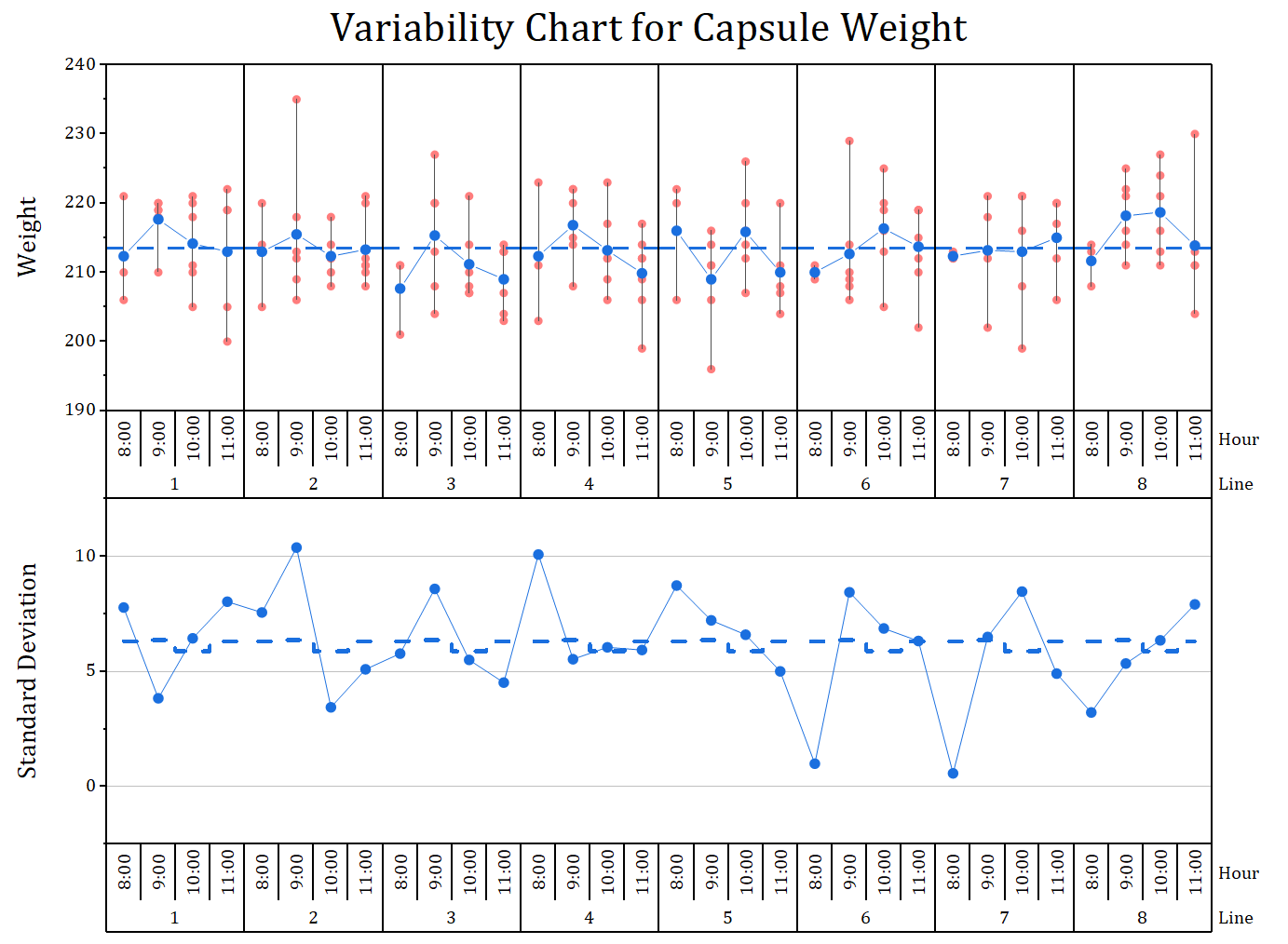
The variability chart is a powerful tool to visualize the relationship between factors and a dependent variable. It can graphically display and connect the mean values at each factor level combination
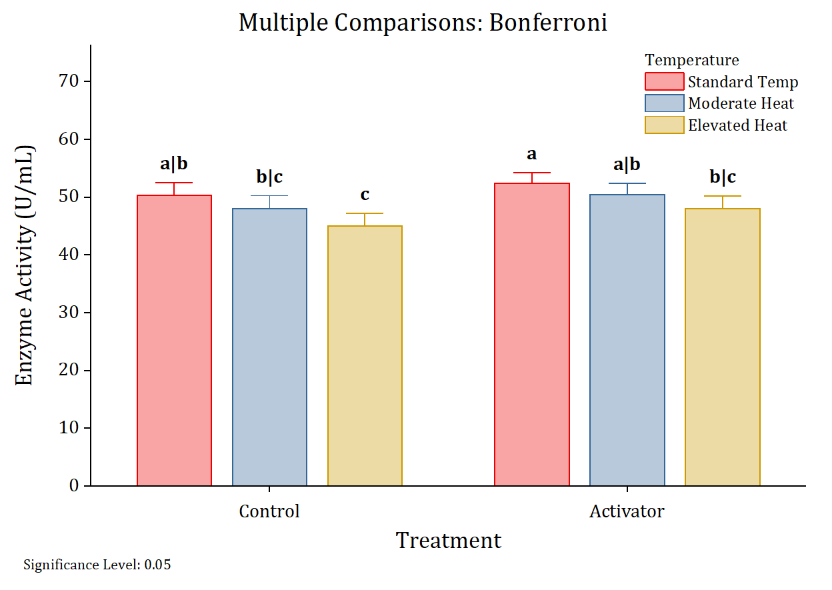
Multiple comparison plots can be created directly from ANOVA and t-test report sheets. Statistical results are automatically carried over to the plot, so group differences are revealed at a glance.
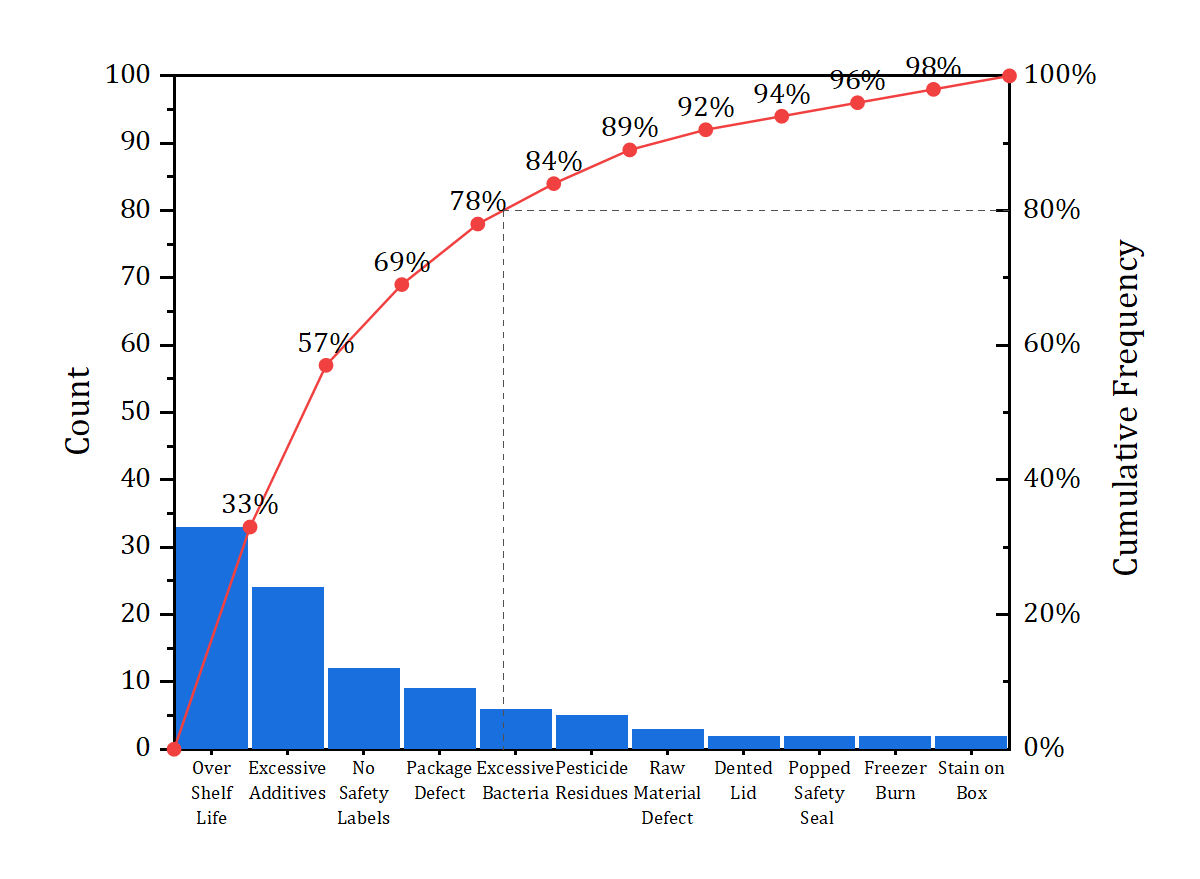
Pareto chart depicting food defects in a sampling test. Origin supports creating pareto chart from raw data or binned data.
Reliability Analysis
Reliability Analysis in Origin supports following features
- Distribution Analysis (Right Censoring)
- Parametric Distribution Analysis
- Nonparametric Distribution Analysis
- Identify Distribution
- Distribution Overview
- Distribution Analysis (Arbitrary Censoring)
- Parametric Distribution Analysis
- Nonparametric Distribution Analysis
- Identify Distribution
- Distribution Overview
- Regression with Life Data
- Regression with Life Data
- Cox Proportional Hazard Model
- Probit Analysis
- Nonparametric Survival Analysis
- Accelerated Life Testing(ALT)
- Life Test Plans
- Demonstration
- Estimation
- Accelerated Life Testing Plan
- Warranty Analysis
- Transform Warranty Data
- Warranty Prediction
Monte Carlo Simulation
The Monte Carlo Simulation tool supports the following features:
- Monte Carlo Simulation
- Multiple Inputs and Outputs
- Probability Distributions, including Triangular and Truncated Normal
- Automatic Distribution Fitting from Worksheet Data
- Import Models from GLR, DOE, and NLFit Reports
- Process Capability Analysis (Cpk/Ppk, DPMO)
- Parameter Optimization
- Optimize Multiple Controllable Inputs Simultaneously
- Support for Controllable and Noise Variables
- Custom Optimization Objectives and Search Bounds
- Sensitivity Analysis
- Sensitivity Curves for Multiple Inputs
- Tornado Plot Ranking Input Impact
- Input Standard Deviation Analysis
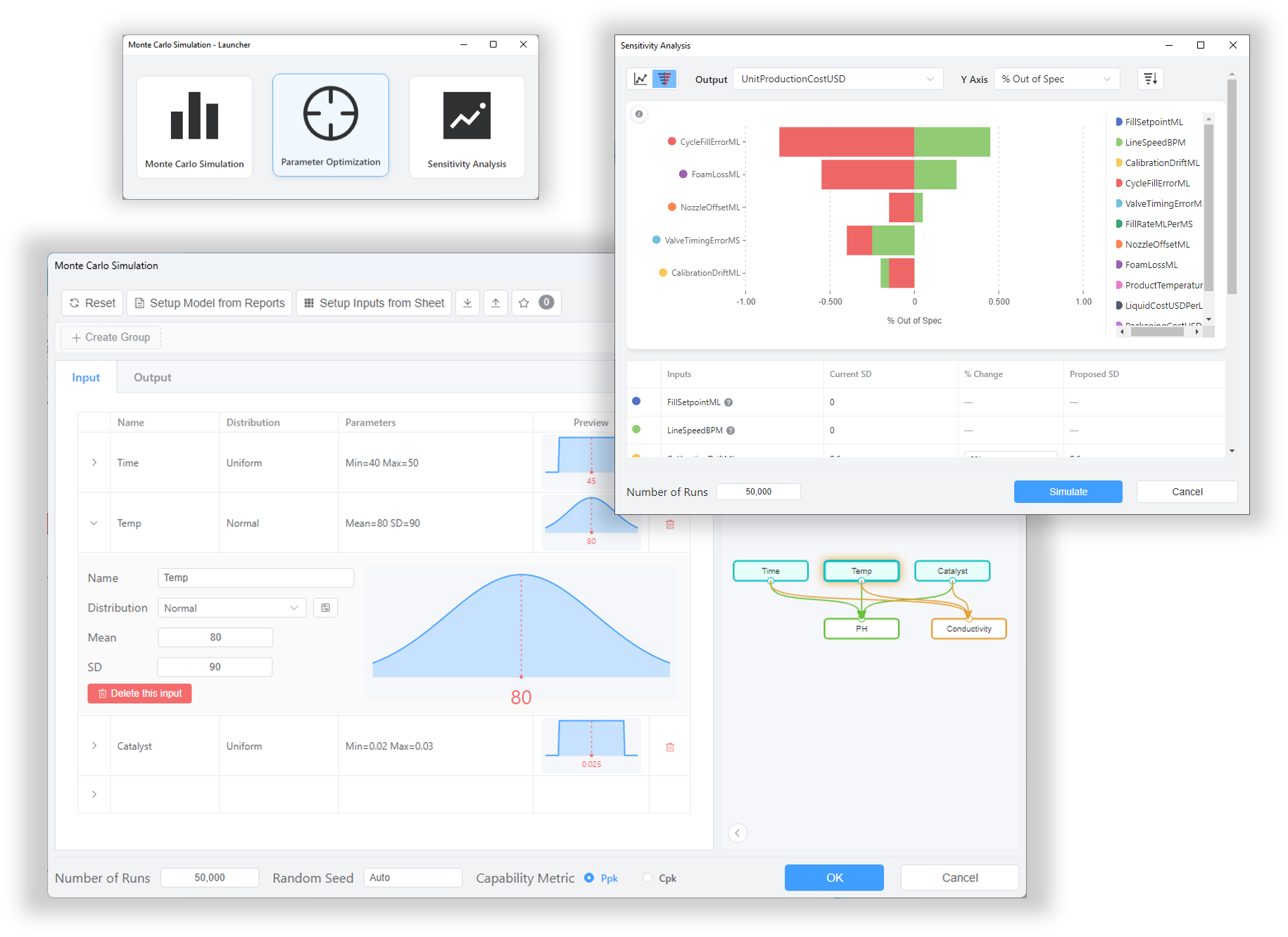
The Monte Carlo Simulation tool enables you to explore uncertainty, evaluate process capability, identify key factors, and optimize model inputs
Additional Tools
 ANOVA
- One, Two, Three-Way ANOVA
- Repeated Measure ANOVA
- Means Comparison / Post-hoc Tests
- Linear Mixed Effects Models
- One way and Two way MANOVA
Learn More
 Hypothesis Testing
- One, Two, Paired Sample T-Test for Mean
- One, Two Sample Test for Variance
- Equal Variance Test
- One , Two Sample Proportion Test
- Test for Homogeneity of Proportions
- One, Two Sample Poisson Rate Test
- Chi-Square Goodness-of-Fit Test
- Power and Sample Size
Learn More
 Multivariate Analysis
- Principal Component Analysis
- Cluster Analysis
- Discriminant Analysis
- Partial Least Square
- Decision Tree Analysis
Learn More
 Regression
- Linear Regression
- General Linear Regression
- Best Subset Selection
- Logistic Regression
- Poisson Regression
- Nonlinear Regression
Learn More
 Time Series Analysis
- Trend & Decomposition
- Correlation
- Smooth
- ARIMA Model
- Stationary Test
Learn More