1.1 Basic Features
Language Basic Features
Origin C is a high-level language closely based on ANSI C. In addition, Origin C supports a number of C++ FeaturesC++ features—including classes, mid-stream variable declarations, overloaded functions, references, and default function arguments. Origin C also supports collections and the foreach and using statements from the C# FeaturesC# programming language.
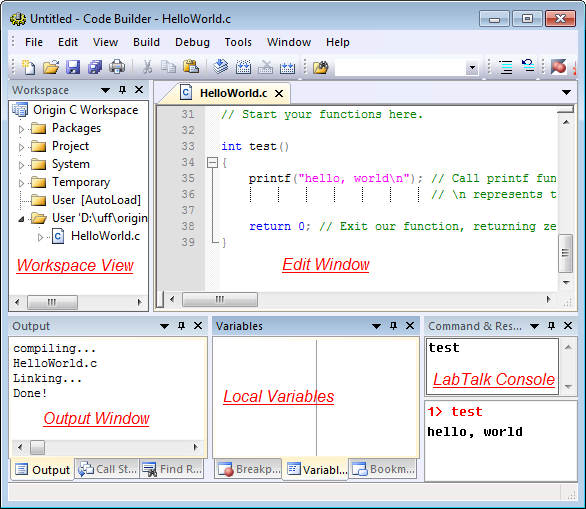
Origin C programs are developed in Origin’s Integrated Development Environment (IDE), Code Builder. Code Builder includes a source editor with syntax highlighting, a workspace window, compiler, linker, and debugger. For details, see Help: Programming: Code Builder.
Using Origin C lets you fully leverage Origin’s data import/handling, graphing, analysis, and image export. Applications written in Origin C typically execute much faster than equivalent LabTalk scripts.
Hello World FunctionHello World Tutorial
This quick tutorial shows how to use Code Builder to create an Origin C function and call it from Origin. The function is simple, but the workflow is the same for larger projects.
- Click the Code Builder button
 on Origin’s Standard toolbar to open Code Builder.
- In Code Builder, click the New button
 on the Standard toolbar to open the New File dialog.
- In the dialog, select C File, then enter HelloWorld in the File Name box.
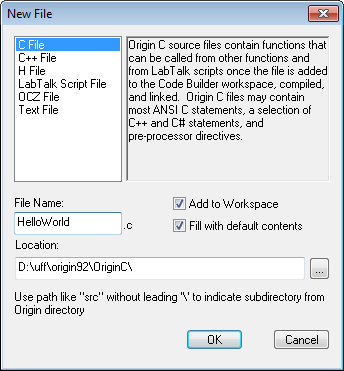
- Click OK. The new file opens in Code Builder’s Multiple Document Interface (MDI).
- Copy or type the following Origin C code beneath the line // Start your functions here:
int test()
{
    printf("hello, world\n"); // Print text; \n is the newline character
    return 0;                  // Exit our function, returning zero to the caller
}
- Click the Build button
 to compile and link HelloWorld.C. The Output window should show a successful build.
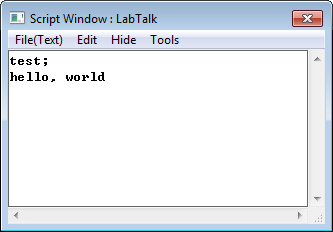
- Functions, ExecutionNow call the function from Origin. Open the Script Window (Origin menu: Window: Script Window), type test, then press ENTER. The function runs and prints hello, world on the next line.
- You can also call the function in LabTalk Console section in Code Builder. See the bottom-right part of Code Builder image above. If it's hidden, check View: LabTalk Console menu to turn it on.
 | Once an Origin C file is successfully compiled and linked, all functions defined in it can be called as script commands anywhere in Origin that supports LabTalk during the current session. To be callable from script, function parameters and return values must meet certain criteria; there are also techniques to keep such functions always available. For details, see Origin C Functions (LabTalk Guide).
|